Command guide
What each HASP command does, when to use it, and how it compares to nearby commands.
This guide explains the whole command surface in product terms. Use hasp help <topic> when you need the exact flags for your installed build.
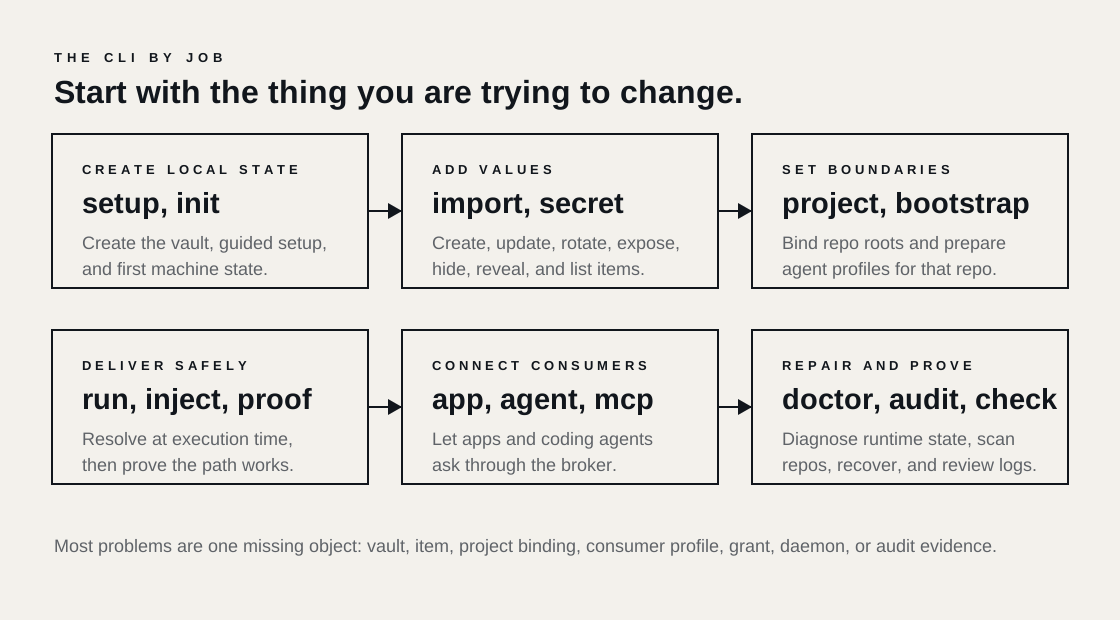
The command names fall into a few jobs:
- create local state
- add or expose secrets
- connect apps and agents
- run brokered commands
- inspect, repair, and recover
First-run commands
hasp setup
Use hasp setup when you want HASP to guide the machine through the first useful state.
It can create the vault, choose HASP_HOME, import local secrets, bind a project, connect an agent, install repo hooks, and print the first proof command. Interactive setup asks before it writes convenience files or launchers. Non-interactive setup needs enough flags or environment variables to avoid prompts.
Closest commands:
hasp initcreates the vault.hasp project bindcreates the repo binding.hasp bootstraphandles repo-first agent setup for operators.hasp secret addstarts with one value instead of a whole setup flow.
Use this for a new laptop, a new HASP_HOME, or the first install in a repo:
hasp setup
Use this for CI-like setup where prompts would hang:
hasp setup \
  --non-interactive \
  --hasp-home ~/.hasp \
  --project-root . \
  --agent codex-cli \
  --master-password-env HASP_MASTER_PASSWORD
hasp init
Use hasp init when the local encrypted vault is missing.
It creates the vault under HASP_HOME. It does not bind a repo, connect an app, connect an agent, import values, or install hooks. That narrow behavior makes it useful in scripts and tests.
Closest commands:
hasp setupcan call the same kind of vault creation as part of a guided flow.hasp restore-backupcreates vault state from an encrypted backup.hasp statustells you whether a vault exists and whether HASP can open it.
hasp init
hasp init --json
hasp bootstrap
Use hasp bootstrap when an operator wants to prepare a repo and an agent profile in one command.
Bootstrap is repo-first. It binds the project root, applies aliases, binds imported or existing items, installs hooks when requested, and verifies the profile. It works well for teams that want a repeatable local setup command.
Closest commands:
hasp setupis the guided human flow.hasp agent connectconnects an agent profile after the vault and repo already exist.hasp project bindgives you a binding without agent profile work.
hasp bootstrap --profile codex-cli --project-root .
hasp bootstrap --profile claude-code --project-root . --alias api_key=OPENAI_API_KEY
hasp bootstrap profiles
Use this to list known agent profiles and their support state.
Use the output to choose a first-class profile, a generic MCP path, or a custom command wrapper.
hasp bootstrap profiles
hasp bootstrap profiles --json
hasp bootstrap generic
Use this when an agent can run an MCP or CLI command, but HASP does not ship a first-class profile for it yet.
It binds the repo and writes a generic-compatible profile using hasp mcp as the transport.
hasp bootstrap generic --project-root .
hasp bootstrap doctor
Use this to diagnose a bootstrapped repo/profile pair.
It checks whether the repo, binding, profile config, and proof path still match.
hasp bootstrap doctor --profile codex-cli --project-root .
hasp bootstrap doctor generic --project-root .
hasp bootstrap print-config
Use this when a generic agent needs a config snippet you can paste into its own settings file.
It prints formats such as stdio JSON, Cursor JSON, Codex TOML, and Claude JSON for the generic-compatible path.
hasp bootstrap print-config generic-compatible --format codex-toml
hasp doctor
Use hasp doctor when you expected HASP to work and one layer is broken.
Doctor checks daemon reachability, vault access, project binding, repo hooks, audit state, and version mismatch between CLI and daemon. JSON output uses an allowlist so it does not expose reconnaissance-heavy local details.
Closest commands:
hasp statusprints state, but it does less diagnosis.hasp pingchecks daemon reachability.hasp bootstrap doctorfocuses on one profile bootstrap.
hasp doctor
hasp doctor --project-root .
hasp doctor --fix
hasp doctor --json
Secret lifecycle
hasp import
Use hasp import when the secret already exists in a .env file, JSON credential file, clipboard paste, or shell-export snippet.
Import parses the source and writes vault items. With --preview, it shows what it would import without changing the vault. With --bind, it also exposes imported items to a project binding.
Closest commands:
hasp secret addis better when you want to enter one new value.hasp setis a deprecated scripting alias for one value.hasp write-envmoves in the opposite direction by writing vault values back to an env file.
hasp import .env
hasp import service-account.json
printf 'export OPENAI_API_KEY=sk-test\n' | hasp import --format env -
hasp import --preview --format env -
hasp secret
Use hasp secret as the root for item lifecycle commands.
It covers adding, updating, rotating, deleting, listing, diffing, exposing, hiding, and controlled plaintext access.
hasp secret add
hasp secret list
hasp secret show OPENAI_API_KEY
hasp secret add
Use this to create a new vault item.
Interactive mode prompts for the value. Scripted mode can read from stdin or a file. Inside a repo, HASP asks for explicit exposure. That rule prevents a new secret from becoming visible to the wrong project because you ran the command in a terminal that happened to sit in a repo.
Closest commands:
hasp importhandles many values or structured files.hasp secret updatechanges an existing item.hasp secret exposemakes an existing item visible to a repo.
hasp secret add
printf '%s' "$OPENAI_API_KEY" | hasp secret add OPENAI_API_KEY --from-stdin --expose=always
hasp secret add GCP_SERVICE_ACCOUNT --kind file --from-file ./service-account.json
hasp secret update
Use this to replace an existing item while keeping its identity.
Update is the right command when the provider issued a new value and you want the same name and bindings to keep working.
Closest commands:
hasp secret rotaterecords a rotation-style replacement.hasp secret addcreates a new item.hasp secret deleteremoves the item.
printf '%s' "$NEW_VALUE" | hasp secret update OPENAI_API_KEY --from-stdin
hasp secret rotate
Use this when you replace a value because the old one should stop being trusted.
Rotation helps separate normal edits from incident or lifecycle replacement. Use it with provider-side rotation. HASP can update the local item, but the upstream provider still controls whether the old credential remains valid.
Closest commands:
hasp secret updatereplaces a value without the rotation meaning.hasp audit --secret <name>helps inspect recent use before or after rotation.hasp session revoke --allcuts local active sessions after a rotation.
printf '%s' "$ROTATED_KEY" | hasp secret rotate OPENAI_API_KEY --from-stdin
hasp secret delete
Use this when the item should leave the vault.
Delete removes the local item. If other repos used aliases or exposures for that item, inspect those bindings so stale references do not confuse future runs.
Closest commands:
hasp secret hideremoves repo visibility while keeping the vault item.hasp vault locklocks access without deleting data.hasp export-backupshould run before deletion when you need a recovery point.
hasp secret delete OLD_API_KEY
hasp secret list
Use this to see managed items and visible references.
List is the safest first inspection command because it prints metadata, not raw values.
Closest commands:
hasp secret showinspects one item.hasp project statusshows repo binding visibility.hasp auditshows historical actions.
hasp secret list
hasp secret list --json
hasp secret get and hasp secret retrieve
Use these for metadata-oriented access to one item.
retrieve is an alias for get. Keep these in scripts when you need structured item details. Use reveal or copy when you need plaintext.
Closest commands:
hasp secret showis human-facing metadata.hasp secret revealprints plaintext after the proper checks.hasp secret copywrites plaintext to the clipboard after the proper checks.
hasp secret get OPENAI_API_KEY --json
hasp secret show
Use this when a human wants to inspect one item without reading the value.
Show answers questions such as kind, visibility, and references. It should be the default inspection command during support work.
hasp secret show OPENAI_API_KEY
hasp secret reveal
Use this when a human must print the raw value.
Reveal carries more risk than show. In protected agent workflows, HASP blocks raw reveal unless an operator grants a short plaintext exception.
Closest commands:
hasp secret copyavoids terminal output by writing to the clipboard.hasp runpasses the value to a child process without printing it.hasp session grant-plaintextcreates the temporary exception for protected flows.
hasp secret reveal OPENAI_API_KEY
hasp secret copy
Use this when you need plaintext in the clipboard rather than stdout.
Copy has the same safety concerns as reveal. The clipboard is still plaintext. Prefer brokered delivery for commands and agents.
hasp secret copy OPENAI_API_KEY
hasp secret diff
Use this to compare a repo-visible env file or candidate source against managed values.
Diff helps when you are migrating a repo away from .env. It shows which values match HASP-managed items and which values remain unmanaged.
Closest commands:
hasp check-reposcans for managed values that leaked into files.hasp import --previewshows what HASP would import.hasp write-envwrites selected managed values back to a file.
hasp secret diff .env
hasp secret expose
Use this to make an existing vault item visible to a repo.
Expose creates or updates the project binding view. The repo can then ask for the item by the exposed reference or alias.
Closest commands:
hasp secret add --expose=alwayscreates and exposes in one step.hasp project bind --alias name=itemadds aliases while binding a project.hasp secret hideremoves repo visibility.
hasp secret expose OPENAI_API_KEY --project-root . --alias secret_01
hasp secret hide
Use this to remove repo visibility while keeping the item in the vault.
Hide is safer than delete when the value still belongs on the machine but one project should stop seeing it.
hasp secret hide OPENAI_API_KEY --project-root .
hasp set
Use hasp secret add for new work.
hasp set remains for one-release compatibility with older scripts that add or replace a single value without prompts.
printf '%s' "$API_KEY" | hasp set --name OPENAI_API_KEY --value-stdin
hasp capture
Use hasp secret add for new work.
hasp capture is the older broker-oriented value capture command. It can save a value and bind it to a repo with grants. New docs and scripts should move to hasp secret add with explicit exposure.
hasp capture --name OPENAI_API_KEY --value "$OPENAI_API_KEY" --project-root . --bind --grant-write
Project boundaries
hasp project
Use hasp project to manage repo boundaries.
Project commands decide where a secret can be requested. They do not create provider credentials and they do not run commands.
hasp project status
hasp project bind --project-root .
hasp project requirements --project-root .
hasp project bind
Use this to bind one repo root.
Bind records the project root, default policy, aliases, and git-hook preference. By default, HASP expects a git repo. Pass --allow-non-git when you want a non-git directory as the boundary.
Closest commands:
hasp setup --project-root .can bind during first run.hasp bootstrap --project-root .binds and connects an agent profile.hasp project adoptbinds many repos under a parent directory.
hasp project bind --project-root . --alias api_key=OPENAI_API_KEY
hasp project status
Use this to inspect what a repo can see.
Status shows the binding, aliases, visible references, hooks, and default policy for a project root.
hasp project status --project-root .
hasp project status --project-root . --json
hasp project unbind
Use this to remove the project boundary.
Unbind does not delete vault items. It removes the repo's access path to those items.
hasp project unbind --project-root .
hasp project adopt
Use this for workspaces with many repos.
Adopt scans under a directory for git roots and binds each candidate with the current project defaults. Run --preview first.
hasp project adopt --under ~/work --preview
hasp project adopt --under ~/work
hasp project requirements
Use this to inspect the value-free manifest contract for a repo.
Requirements output shows refs, kinds, target usage, and whether the local vault
has and exposes each item. It may suggest hasp secret add commands for missing
items, but it never prints values or runs target commands.
hasp project requirements --project-root .
hasp project requirements --project-root . --target server.dev --json
hasp project targets
Use this to list manifest targets without exposing secret values.
hasp project targets --project-root .
hasp project targets --project-root . --json
hasp project examples
Use this to check or write placeholder example files such as .env.example or
Secrets.example.xcconfig.
Generated examples contain placeholders only. They do not resolve vault values.
hasp project examples --project-root . --target server.dev --check
hasp project examples --project-root . --target server.dev --write
hasp project doctor
Use this for project-specific manifest diagnostics.
hasp project doctor --json uses a separate safe schema from top-level
hasp doctor --json. It reports diagnostic codes and booleans, not values,
socket paths, raw command output, or environment dumps.
It also reports target_drift, unavailable target commands, stale examples,
unignored generated outputs, workspace-visible secret delivery, and vault kind
mismatches without printing command argv or value paths.
hasp project doctor --project-root .
hasp project doctor --project-root . --json
hasp check-repo
Use this before commits, releases, or support bundles.
Check-repo scans files for managed values. It catches the failure mode where a value controlled by HASP appears in the repo anyway.
Closest commands:
hasp secret diffcompares a candidate env file with managed values.- git hooks from
hasp project bindcan run this before commits. hasp redactexists as a hidden stream filter for managed values.
hasp check-repo --project-root .
Brokered delivery
hasp run
Use hasp run when a normal command needs secret values as environment variables.
Run resolves references, applies project and secret grants, starts the child process, and keeps managed values out of the repo. It is the default safe path for CLIs that read env vars.
Closest commands:
hasp injectalso handles temp file credentials.hasp write-envwrites a persistent env file.hasp proofwraps a small run to test the brokered path.
hasp run --project-root . \
  --env OPENAI_API_KEY=secret_01 \
  --grant-project window \
  --grant-secret session \
  -- sh -c 'test -n "$OPENAI_API_KEY"'
When a repo has targets in .hasp.manifest.json, use --target to expand only
that target's declared delivery subset:
hasp run --project-root . --target server.dev --grant-project window --grant-secret session
Use --dry-run to inspect the execution plan. Use --explain when you need a structured explanation of what HASP would resolve.
hasp inject
Use hasp inject when a command needs env vars, files, or both.
Some SDKs refuse env content and require a credential file path. Inject can materialize file refs for the command lifetime and point an env var at that file.
Closest commands:
hasp runfits commands that need env vars and no temp files.hasp write-envcreates a persistent file by design.hasp app runapplies a saved app consumer profile.
hasp inject --project-root . \
  --env API_TOKEN=secret_01 \
  --file GOOGLE_APPLICATION_CREDENTIALS=@gcp_service_account \
  -- node scripts/sync.js
Target injection is useful for file-shaped credentials:
hasp inject --project-root . --target release.sign -- ./deploy.sh
hasp write-env
Use hasp write-env when you accept a repo-visible env file.
Write-env exists for tools that do not work with brokered env injection. It should be explicit in scripts and review notes because it materializes secrets into a file.
Closest commands:
hasp runavoids writing a file.hasp injectcreates temp files for one command.hasp check-repocan catch managed values after accidental writes.
hasp write-env --project-root . \
  --output .env.local \
  --env OPENAI_API_KEY=secret_01
write-env --target can materialize a configured target output such as a macOS
xcconfig file, but it still requires explicit convenience approval:
hasp write-env --project-root . --target build.config --grant-convenience window
hasp proof
Use hasp proof to confirm that a repo can receive one brokered value.
Proof replaces the long first-run one-liner with a named command. It checks the practical path: vault item, repo binding, grant, and child process delivery.
Closest commands:
hasp rungives you the full execution surface.hasp doctordiagnoses layers after proof fails.hasp project statusshows the binding side of the proof.
hasp proof --secret OPENAI_API_KEY --project-root .
Apps
hasp app
Use hasp app when a local application needs managed secrets.
An app consumer stores a name, command, project root, and mappings. After connection, hasp app run <name> can execute it with the right brokered values.
hasp app connect myapp --project-root .
hasp app run myapp
hasp app connect
Use this to create or update an app profile.
Connect binds the project if needed, records env/file/dotenv mappings, and can install a launcher under HASP_HOME/bin after explicit consent.
Closest commands:
hasp runis better for one-off commands.hasp app installinstalls a launcher for an existing app profile.hasp agent connecthandles coding agents, not app commands.
hasp app connect myapp \
  --project-root . \
  --cmd "npm run dev" \
  --env OPENAI_API_KEY=secret_01
When the repo manifest declares a target, an app profile can be seeded from that target. The saved profile is local state and does not silently change when the manifest changes later.
hasp app connect web --project-root . --target server.dev
hasp app run
Use this to run a connected app profile.
Run reads the saved app mappings and executes the app through the broker.
hasp app run myapp
hasp app install
Use this when you want a stable launcher on PATH.
Install writes a launcher script for an app profile. The launcher calls HASP so normal app startup still gets brokered secrets.
hasp app install myapp
hasp app shell
Use this when you want an interactive shell with the app profile's managed environment.
Shell helps with local debugging. Treat the shell as sensitive because child commands can read the injected environment.
hasp app shell myapp
hasp app disconnect
Use this to remove an app consumer.
Disconnect removes the app profile and its launcher state. It does not delete vault items.
hasp app disconnect myapp
hasp app list
Use this to inspect configured app consumers.
hasp app list
hasp app list --json
Agents
hasp agent
Use hasp agent when a coding agent needs brokered access.
Agent commands connect profiles, serve MCP, launch wrappers, and list support status.
hasp agent connect codex-cli --project-root .
hasp agent mcp codex-cli
hasp agent connect
Use this to connect one agent profile to a project.
Connect writes the local profile state and config needed for the agent to reach HASP. The profile decides whether the best path is first-class MCP, a wrapper, or a generic-compatible config.
Closest commands:
hasp bootstrap --profile <id>does repo-first setup plus verification.hasp mcpserves the generic MCP surface.hasp app connectis for app commands, not coding agents.
hasp agent connect codex-cli --project-root .
hasp agent mcp
Use this as the profile-aware MCP server command for an agent.
It opens or uses a daemon-backed session for the profile and project, then serves the MCP tool surface.
hasp agent mcp codex-cli
hasp agent launch
Use this when you want HASP to start the agent process.
Launch can propagate HASP session metadata to child processes. That gives stronger coverage than an agent you start outside HASP with the MCP command alone.
hasp agent launch codex-cli -- codex
hasp agent shell
Use this to open a shell that carries the agent-safe session context.
Shell helps when the agent or its helper commands need inherited HASP session state.
hasp agent shell codex-cli
hasp agent disconnect
Use this to remove an agent connection.
Disconnect removes local profile state. It does not delete vault items or project bindings.
hasp agent disconnect codex-cli --project-root .
hasp agent list
Use this to see connected agents.
hasp agent list
hasp agent list-supported
Use this to see profiles HASP knows about and how complete their support is.
Use it to choose between first-class profile support and the generic MCP path.
hasp agent list-supported
hasp agent list-supported --json
hasp mcp
Use this as the generic MCP server command.
hasp mcp is the low-level stdio server. Profile-aware commands such as hasp agent mcp codex-cli add agent-specific session behavior around the same idea.
printf '{"jsonrpc":"2.0","id":1,"method":"tools/list"}\n' | hasp mcp
Sessions and plaintext exceptions
hasp session
Use hasp session to inspect or control broker sessions.
Most workflows manage sessions for you. Session commands are for debugging, incident response, and explicit plaintext exceptions.
hasp session list
hasp session open
Use this to open a broker session by hand.
Manual sessions help when you are debugging MCP or wrapper behavior outside the normal agent launcher flow.
hasp session open --project-root . --host-label local-debug
hasp session list
Use this to inspect active sessions.
--mine filters to sessions owned by the local user.
hasp session list
hasp session list --mine --json
hasp session resolve
Use this to inspect what a session token points to.
Resolve helps diagnose token propagation and project-root mismatches.
hasp session resolve --token "$HASP_SESSION_TOKEN"
hasp session revoke
Use this to shut down one session or all active sessions.
Revoke is useful after rotation, after a lost terminal, or when an agent run should stop receiving brokered access.
hasp session revoke --token "$HASP_SESSION_TOKEN"
hasp session revoke --all
hasp session grant-plaintext
Use this when a protected agent flow needs a short exception for secret reveal or secret copy.
Plaintext grants should stay rare and short. They permit display or clipboard access. They do not change the vault item or repo binding.
hasp session grant-plaintext \
  --token "$HASP_SESSION_TOKEN" \
  --item OPENAI_API_KEY \
  --action reveal \
  --scope once
Runtime and vault state
hasp daemon
Use this to manage the local broker runtime.
The daemon serves brokered requests for CLI, app, and agent flows. Normal commands start or reach it when needed. Use daemon commands when you need explicit control.
hasp daemon start
hasp daemon status
hasp daemon stop
hasp daemon serve
hasp status
Use this for a quick state readout.
Status reports vault and daemon state. It does not run the same repair checks as doctor.
hasp status
hasp status --json
hasp ping
Use this to check daemon reachability.
Ping is narrower than status and doctor. Use it in scripts that need to know whether the daemon answers.
hasp ping
hasp vault
Use hasp vault for local vault security operations.
Vault commands affect local access material. They do not manage project bindings or app profiles.
hasp vault lock
hasp vault lock
Use this to lock local vault and session material.
Lock is useful before you hand off a machine, pause work, or leave a shared terminal.
hasp vault lock
hasp vault forget-device
Use this to remove device convenience material.
Forget-device is stronger than lock when local device trust should reset. You will need to unlock again through the normal path.
hasp vault forget-device
hasp vault rekey
Use this to change vault encryption credentials.
Rekey protects local-at-rest material with new credentials. It does not rotate upstream API keys. Use hasp secret rotate for provider secret rotation.
hasp vault rekey
Audit and recovery
hasp audit
Use this to read the local audit log.
Audit shows operations and access events without dumping managed values. Use filters when you need a narrower view. Use --incident-bundle for a redacted support or review artifact.
Closest commands:
hasp audit tailfollows recent events.hasp doctorreports whether audit is degraded.hasp secret rotateandhasp session revokeare common follow-ups after a leak.
hasp audit
hasp audit --json
hasp audit --incident-bundle
hasp audit verify
hasp audit tail
Use this while you test setup, MCP, or app launchers.
Tail prints recent events and can follow the log.
hasp audit tail
hasp audit tail -n 100
hasp audit tail --follow
hasp export-backup
Use this to write an encrypted backup of local HASP state.
Backups protect against machine loss and bad local edits. Store the backup away from the repo and protect the backup passphrase.
hasp export-backup --output ./hasp.backup.json
hasp restore-backup
Use this to restore an encrypted backup.
Restore writes local vault state from a backup. Inspect project bindings and active sessions after restore so stale local assumptions do not surprise you.
hasp restore-backup --input ./hasp.backup.json
Maintenance and reference
hasp version
Use this to print the build version.
It helps compare CLI and daemon versions during support. hasp doctor also reports version mismatch.
hasp version
hasp version --json
hasp completion
Use this to generate shell completion scripts.
Completion helps avoid typo-driven failures and exposes nested subcommands in the shell.
hasp completion zsh
hasp completion bash
hasp upgrade
Use this to install a signed newer release.
Upgrade verifies the requested release path and refuses unsafe non-interactive upgrades unless you pass the required confirmation flags.
Closest commands:
- install scripts handle the first install.
hasp versionshows the current build.hasp doctorcatches CLI and daemon version mismatch after upgrade.
hasp upgrade --version 0.1.36 --yes
hasp docs
Use this to render CLI help topics as Markdown.
The generated file is useful for release artifacts, offline review, and docs drift checks. The generated reference preserves help text inside fenced code blocks.
hasp docs markdown --out ./hasp-cli-reference.md
hasp tui
Use hasp project status instead.
hasp tui now prints a one-shot project snapshot for compatibility. New docs and scripts should call the explicit project command.
hasp project status --project-root .
hasp internals help topic
Use this when you are writing integrations or debugging lower-level behavior.
The internals topic explains broker vocabulary that normal first-run docs avoid.
hasp help internals
hasp exit-codes help topic
Use this when a script needs stable error buckets.
HASP emits structured JSON errors for JSON-mode failures, with codes such as E_USER_INPUT, E_PERMISSION, and E_DAEMON_UNREACHABLE.
hasp help exit-codes